
Opera GX
Screenshots

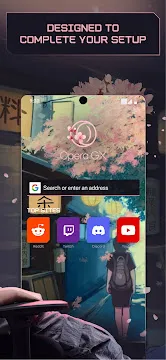
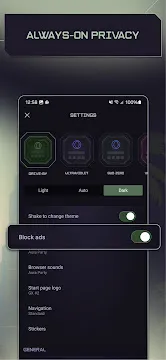
Opera GX: Gaming Browser offers mobile users a custom browsing experience. Many standard mobile tools offer basic web surfing. However, modern gamers need specialized features and a matching style. Opera GX: Gaming Browser offers a distinct interface layout. This appearance matches high-end gaming hardware setups. It includes custom sound effects and visual themes. Therefore, users can enjoy a coherent design across all devices. This browser changes how you view websites on your mobile device. You can browse your favorite sites with extreme speed. You will also stay connected to your gaming communities easily.
Here are the core elements you will explore in this detailed guide:
- Custom interface themes and colors.
- The innovative Fast Action Button system.
- The integrated gaming news center.
- Secure and fast file synchronization tools.
- Built-in ad blocking options.
Why Choose Opera GX: Gaming Browser for Your Mobile Needs?
Mobile internet users often face slow loading times and boring designs. Consequently, they seek alternatives to standard mobile browsers. Opera GX: Gaming Browser fixes these issues by focusing on speed and style. The developers created it specifically for people who love video games. It loads pages quickly because it uses advanced compression technology. Furthermore, it consumes less battery power during long browsing sessions.
You can open multiple tabs without slowing down your operating system. Then, you can switch between tasks instantly. Gamers will appreciate the smooth performance during everyday tasks. Therefore, this tool is ideal for daily web navigation.
You can easily customize the performance behavior to match your needs. For example, you can toggle background data usage. This setting helps you save mobile data when you travel. It also keeps your connection stable for online mobile gaming.
Unique Themes and Visual Styles in Opera GX: Gaming Browser
Visual appeal plays a major role in modern mobile software design. Because of this preference, Opera GX: Gaming Browser lets you change its entire appearance. You can choose from several neon color palettes. For instance, you can select the famous GX Classic theme. Alternatively, you can choose Purple Haze or White Wolf. These options match popular gaming hardware colors perfectly.
The interface also features custom haptic feedback and vibrations. Then, the browser feels alive when you tap on buttons. This active design keeps your browsing sessions engaging. You will not find these unique design choices in regular browsers. Consequently, your phone will look much more stylish.
Consider these visual features available in the menu:
- True dark mode for comfortable night reading.
- Custom wallpapers designed by digital artists.
- Dynamic accent colors that change with your theme.
- Adjustable icon sizes for better screen clarity.
How the Fast Action Button Changes Your Browsing Experience
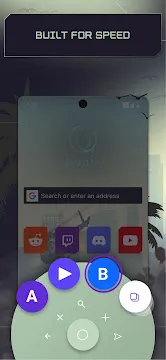
One-handed navigation can be difficult on large mobile screens. However, Opera GX: Gaming Browser solves this common problem effectively. The software includes a special Fast Action Button at the bottom. This button stays within easy reach of your thumb at all times. When you press it, a radial menu expands instantly.
Then, you can open new tabs quickly. You can also close tabs or refresh pages with simple directional swipes. Therefore, you do not need to stretch your hand to reach the top bar. This design improves comfort during long reading sessions. Furthermore, it speeds up your search queries significantly.
You can find information much faster with this interface helper. The button also provides subtle vibrations when you trigger actions. Because of this tactile response, you always know when an action succeeds. You can turn off this feature in settings if you prefer silence.
Staying Updated with the GX Corner inside Opera GX: Gaming Browser
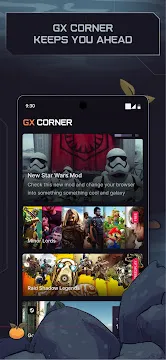
Gamers always want to know about new releases and major discounts. Because of this requirement, the software includes the GX Corner. This dedicated section keeps you informed without leaving Opera GX: Gaming Browser. It displays a clear calendar of upcoming game releases.
Additionally, it highlights free games and massive sales on various platforms. You can view news from reliable gaming media outlets daily. Therefore, you will never miss a major gaming event again. The data updates automatically every time you open the screen.
Then, you can share deals with friends easily. This feature saves you from checking multiple websites manually. You can customize the news feed to show only your favorite genres. For instance, you can choose role-playing games or strategy titles.
Seamless File Sharing with the My Flow Sync Feature
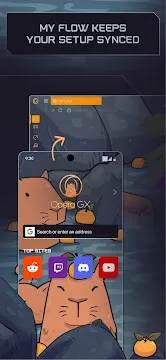
Many people use both desktop computers and mobile phones for gaming. Consequently, transferring files between devices can become a hassle. Opera GX: Gaming Browser solves this by including the My Flow feature. This option connects your mobile browser to your computer instantly.
You only need to scan a simple QR code to pair them. Then, you can share links, notes, and files effortlessly. The connection uses secure encryption to protect your private data. Furthermore, you do not need to create an account or log in.
The shared items appear in a convenient chat-like interface. Therefore, you can access your important files on any screen.
My Flow supports many file types for your convenience:
- Website links and long text articles.
- Mobile screenshots and gameplay images.
- Short text notes and reminder lists.
- Small game files and configuration documents.
Built-in Privacy and Security Features for Active Mobile Gamers
Online security is vital when you browse gaming forums and download files. Because threats exist everywhere, Opera GX: Gaming Browser protects your data actively. It includes a powerful built-in ad blocker. This tool stops intrusive advertisements from interrupting your web experience.
Consequently, web pages load much faster on slow mobile connections. The browser also blocks malicious cryptocurrency mining scripts. These scripts can drain your battery and slow down your phone. Additionally, a cookie dialog blocker removes annoying pop-ups automatically.
Therefore, you can explore the internet safely and without constant interruptions. Your mobile data stays private at all times. The software never tracks your search history for advertising purposes. You can also activate the built-in tracker blocker for extra safety.
Conclusion
Opera GX: Gaming Browser redefines how gamers interact with the mobile web. It combines stunning visual design with practical utility features. The custom themes allow you to match your mobile browser with your PC setup. Furthermore, the Fast Action Button makes one-handed navigation effortless.
You can stay informed about the gaming industry using the integrated GX Corner. Additionally, the My Flow feature removes the friction from cross-device file sharing. Built-in security tools ensure your browsing remains private and secure.
Therefore, choosing Opera GX: Gaming Browser upgrades your daily internet routine. Download the browser today to experience these specialized features yourself. You will quickly notice the improvement in speed and convenience.